You have a few PDFs, maybe some photos of a receipt or an ID, and a form that takes one file. Here is how to put them together on an Android phone without sending them anywhere.
Can you merge PDFs on Android without an app?
Not with what comes on the phone. Android’s file manager and Google Drive can open and share PDFs, but neither has a button that joins two of them into one.
That leaves two ways:
| Online PDF merger | JoinPDF | |
|---|---|---|
| Install anything | No | Yes |
| Your files are uploaded | Yes, to the site’s server | No, they stay on your phone |
| Works offline | ✗ | ✓ |
| Photos in the same PDF | Some sites | ✓ straight from your gallery |
| Choose the order | Usually by file | By page |
| Move, rotate or remove single pages | Some sites | ✓ |
| Free | Often with a daily limit | ✓ up to 3 pages per PDF |
An online merger is fine for a menu or a public flyer. For a contract, a bank statement or a scan of your ID, you probably don’t want a copy on someone else’s server.
How to combine PDF files on Android
We make JoinPDF for this.
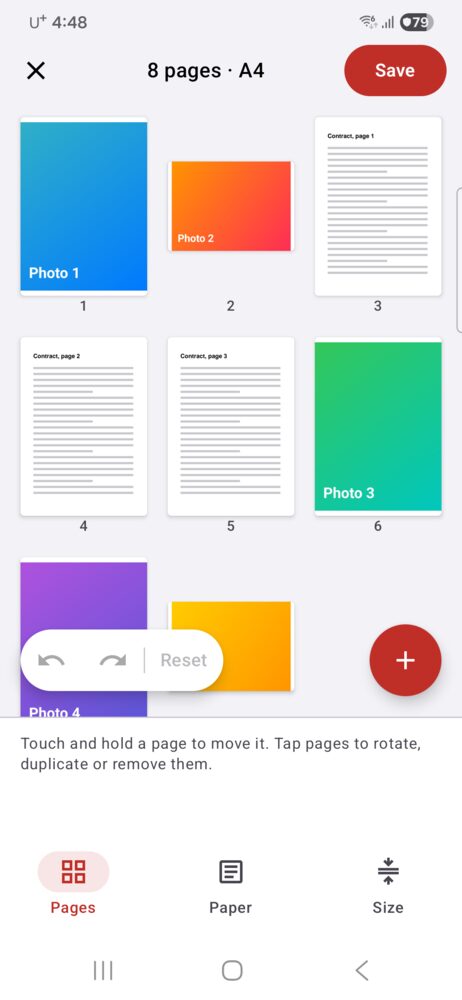
- Tap Choose PDF or files and pick your PDFs. Tap + later to add more, or Choose photos for pictures from your gallery.
- Every page appears on one board, numbered. A three-page PDF becomes three pages you can move on their own.
- Touch and hold a page, then drag it where it belongs.
- Tap pages to select them, then Rotate, Duplicate or Remove. Blank adds an empty page.
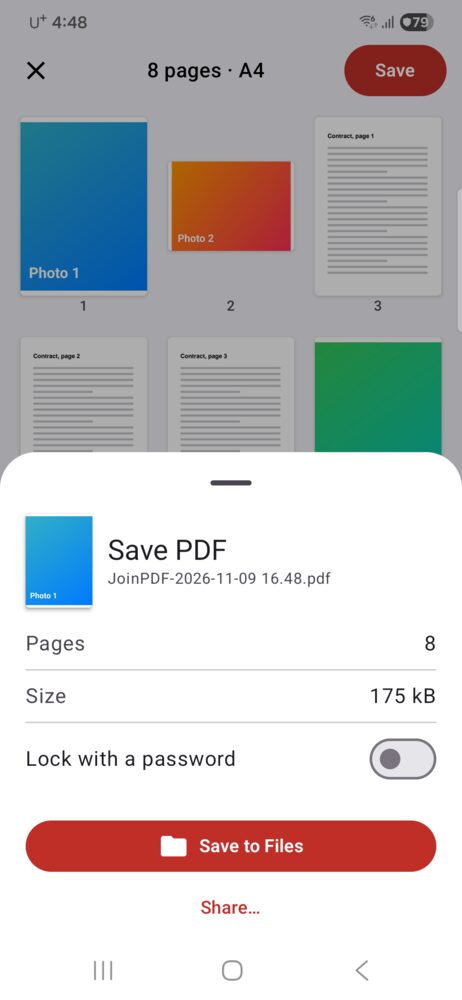
- Tap Save. The sheet shows the page count and file size. Tap Save to Files and pick a folder, or Share… to send it straight to an email or chat.
Have it on paper? Scan a document on the first screen takes the page with the camera, crops it, and puts it on the board like any other page.
Photos and PDF pages are different sizes
A phone photo is taller and narrower than an A4 page, so a mixed PDF can look uneven. Under Paper, choose A4 or Letter and a margin (None, Thin or Wide), and every page is placed on the same size of paper. Original keeps each page as it was.
Can I merge a password-protected PDF?
Yes. When you add a locked PDF, JoinPDF asks for its password, then its pages join the others. The PDF you save does not carry that password. To lock the new one, turn on Lock with a password before you save. Anyone who opens it will need that password.
Is it free?
Saving a PDF of up to 3 pages is free, with no ads and no sign-in. Opening and locking PDFs with a password is free too.
JoinPDF Plus saves any number of pages and adds the smallest file size. It is a 1-year plan or a one-time lifetime purchase.
JoinPDF also runs on iPhone and iPad. On iPhone the Files app can do a simple merge on its own: see how to combine PDF files on iPhone.